Parents
Notices, homework, attendance alerts, fee status, academic reports, bus location and direct feedback to the school — all in one place, in the language you prefer.
“Go paperless, save environment & money with School eDiary”
Upgrade your institution to digital parent–teacher communication. Notices, homework, class diary, attendance, report cards and fee dues reach every parent’s phone the moment you publish them — anytime, anywhere, on any device.
Publish a notice — every parent knows in seconds. Set homework — due dates land on every phone. Mark attendance — parents are told the same minute. Raise a fee — it gets paid inside the app. Track the bus — parents watch it move in real time.
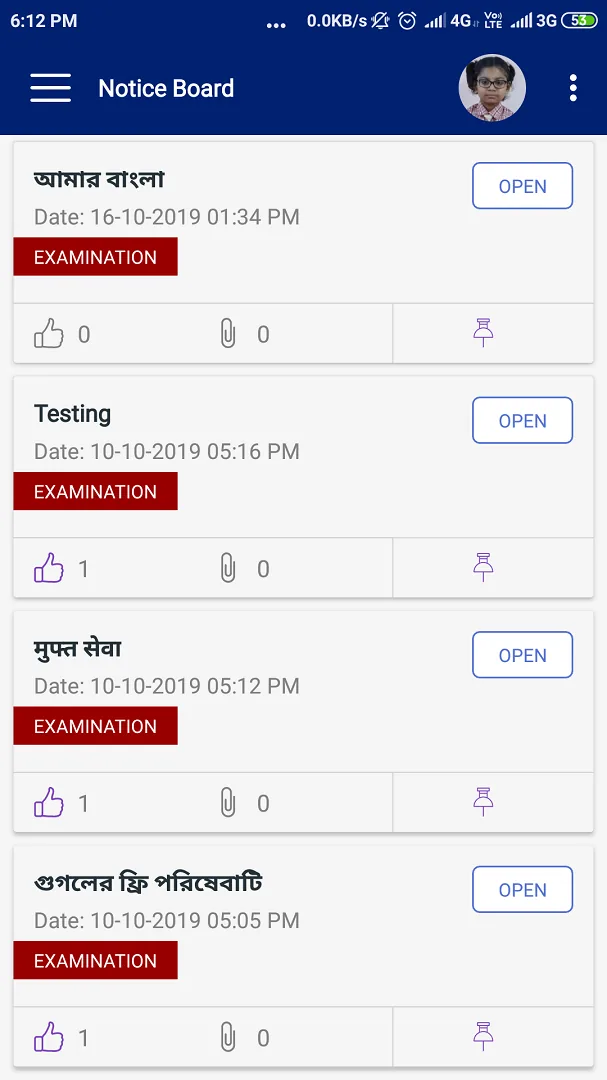
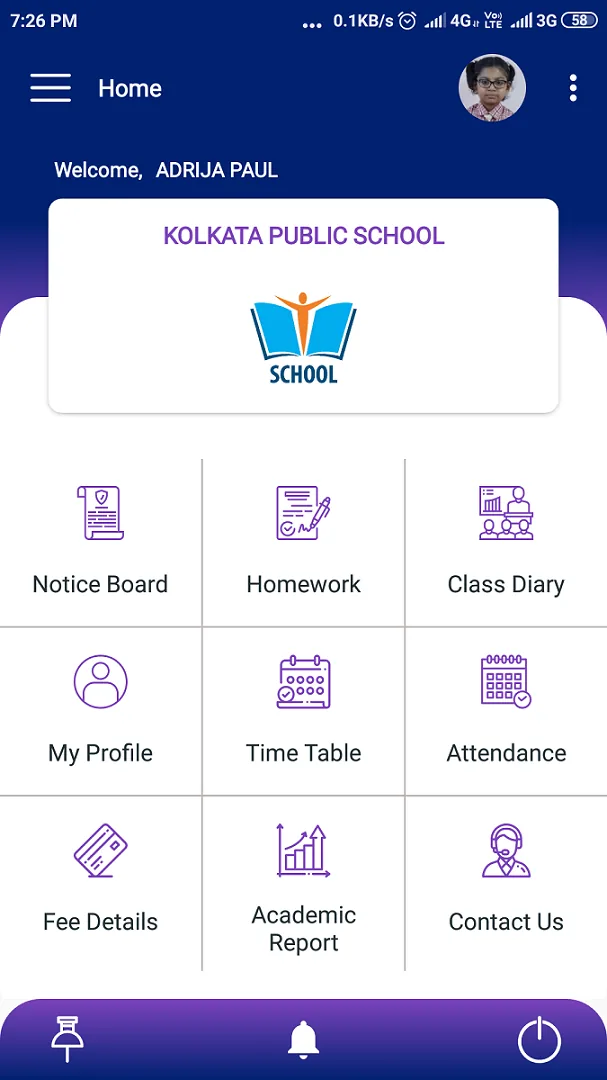
School eDiary is an advanced mobile application for schools to make better communication between students / parents and teachers. With this app parents can always remain up to date with their child’s notices and circulars, homework, class diary, attendance, marks summary, fee summary and much more.
It is a light application with a clean UI designed to replace the paper-based school diary. We are trying to simplify the communication process between school and students or parents — in a completely paperless way.


Every role sees exactly what it needs — nothing more, nothing to learn.
Notices, homework, attendance alerts, fee status, academic reports, bus location and direct feedback to the school — all in one place, in the language you prefer.
Homework with due dates and attachments, assignment submission, class diary, time table, academic calendar, live classes and the daily feed from school.
Publish notices, set homework, maintain the class diary, mark or edit attendance, enter marks class-wise, manage lesson plans and run live classes.
24 purpose-built modules — notice board, homework, class diary, digital almanac, automated attendance, online fee payment and school bus tracking — inside one lightweight app.
Instant alerts on any circulars / notices issued from school. Students & teachers can view, like, download attachments and comment on the notices.
Homework given can be viewed on a click of a button with due date, description, attachments and comments. Students can submit assignments for the homework.
Teachers can add class diary to keep a track of the topics taught in the class with date, description, comments and option to download attached files.
Live classes can be conducted through Zoom / Google Meet / Microsoft Teams. Teachers can view automatically generated attendance reports.
Parents can pay their fees online as per their convenience, peek through the fee records and remain updated about paid & due amounts.
Face, QR or biometric recognition marks students in and out, and parents are notified the moment their ward reaches or leaves the institution. Teachers can view or edit attendance from the app.
Student safety is greatly enhanced with real-time tracking of the school bus. Parents & admins can access live vehicle location.
Teachers & parents can remain updated regarding various rules & regulations and other details of the institution through the digital almanac.
Teachers can add and manage their academic lesson plan from the app. Students will be able to see the topics that need to be taught.
Teachers & students will be able to access month-wise detailed academic & other events of the school right from their mobile app.
Instant notification and detailed view of the student’s & teacher’s attendance in the current academic year including presents, absents, late and leaves.
Students & teachers can inform the school authorities about their absence in advance by applying for leave and uploading supporting documents.
Students & teachers can remain updated regarding various events & topics from the images, links and polls shared by the school on a regular basis.
Teachers & parents can see the term-wise and subject-wise marks statement of their ward, thereby keeping a track of academic performance.
Teachers can easily enter marks class-wise once the evaluation is over, through app or web. Marks can be published or locked for entry class-wise.
Teachers & students can have a look at their daily / weekly time table easily from the application without wasting time in searching for the same.
Displays complete profile of the student including photo, parent details, class teacher details, address and emergency contact number.
Parents and teachers can remain updated about holidays for the session and plan their vacations in advance by viewing the holiday calendar.
Push notifications can be sent regarding notices, homework, classwork, attendance and holidays to keep you updated in your busy schedule.
Parents & teachers can share their valuable feedback with attachment about school infrastructure, curriculum or other issues directly to the admin.
Remain updated about the contact details, website, social media accounts and visiting hours of the school from the app.
The interface can be offered in more than one language, so parents and teachers can use the app in whichever they are most comfortable with.
Various settings available for the users and admins to set notifications on and off as per their convenience.
Dedicated technical support to teachers & admins to help them use the application without any glitch.
From download to daily use — getting started takes only a few minutes.
Download the application from the Google Play Store.
Install and open the application on your mobile.
Register using the School Code, Unique ID and Password sent by your school admin on your registered mobile number.
Start using the School eDiary application with all its features and clean interface.
Every screen is built around one job — read the notice, check the homework, see today’s attendance, pay the fee.


Scroll sideways to see all eleven screens
One stop solution for all the attractive and modern features required by an institution, under the umbrella of Lamda Infotech.
Anyone with basic knowledge of using mobiles can start using our application within minutes of their first login. The app is designed in a clean, easy-to-use manner so parents and teachers face no difficulties.
Relevant features like notice board, homework, class diary, profile, attendance, fee details, academic details, time table and bus tracking — packed into one easy-to-use interface.
Easy customisation and integration with our School On Web ERP for managing your entire campus. It can also be integrated with face, QR or biometric attendance systems and online payment as per your requirement.
Our USP thus far has been regular updates and addition of new features to our applications, along with the best support to our customers.
Priced so that schools of every size can go paperless — saving on printing, stationery and the staff hours spent chasing circulars and fee reminders.
The app, the ERP, attendance hardware and bus tracking come from the same team, so nothing has to be stitched together after the fact.
Student records deserve care. Your institution remains the owner of its data; we process it only to run the service you have asked us to run, in line with India’s Digital Personal Data Protection Act, 2023.
Processed strictly on your institution’s instruction.
Two layers before anyone reaches a child’s record.
Backed up regularly, available wherever you are.
Dedicated support for teachers and admins.
School eDiary sits on top of School On Web, our school management ERP. The office enters a record once — attendance, marks, a fee receipt — and it appears on the parent’s phone straight away. Nothing is entered twice, and nothing goes out of sync.
Admissions, fees, accounts, exams, library and stock — the full campus ERP.
Face, QR or biometric recognition marks students in and out, and parents are alerted the same minute.
Parents pay fees inside the app; receipts and dues reconcile straight into the ERP.
Real-time vehicle location for parents and admins, right up to the stop.
Each of these has a page of its own, with how it works, what it costs you in effort, and the questions schools usually ask.
Tell us about your institution and our team will walk you through School eDiary and School On Web — then set you up with a 30-day trial.
Saltee Plaza, Room No 603, 6th Floor, 1/G Khudiram Bose Sarani, Near Nagerbazar, Kolkata – 700080, West Bengal, India
Monday to Saturday, 10:00 – 18:00 IST
Our enquiry form is hosted on the Lamda Infotech forms portal. It takes about a minute — tell us your institution, size and what you need, and our team will get back to you within one working day.
Prefer to talk? Call +91 85 8383 6494 or use the chat button in the corner.
 Get started
Free on the Google Play Store for parents, students and teachers. Institution admins can also use School eAdmin to manage on the go.
Please note: the app can only be used once your institution is registered with us. If it isn’t yet, get in touch and we will set it up.